
Installing an SD card: where is the slot on Faceter cameras?
Most Faceter camera models are equipped with a MicroSD card slot. This feature enables storing recordings on the card instead of the cloud server.
We cover SD card selection recommendations in a separate guide — read it before purchasing.
Slot Location by Model
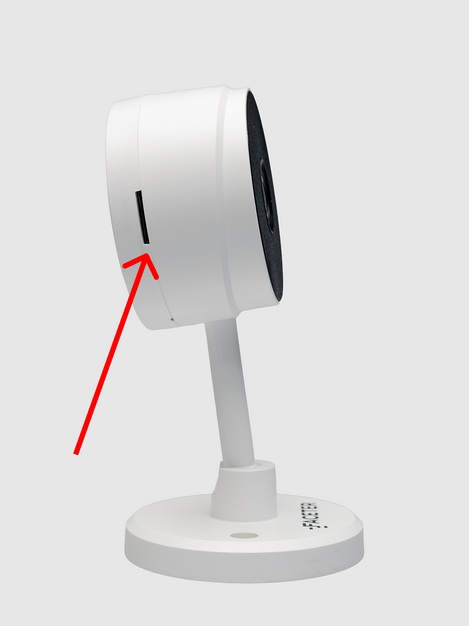
Section titled “Slot Location by Model”- Faceter Mini M1. On the side of the camera body.
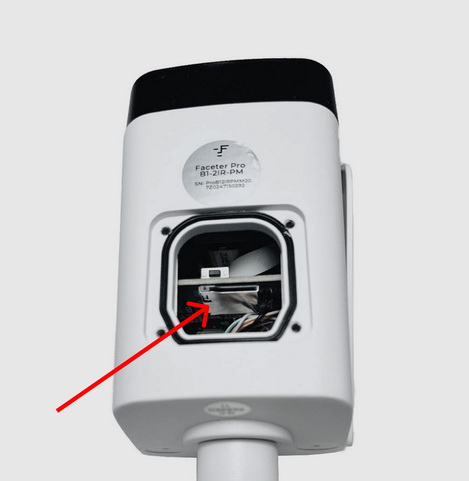
- Faceter Pro B1. On the internal board. Access is through a service opening covered by a sealed cap on the bottom of the camera. Remove the cap by unscrewing four screws.
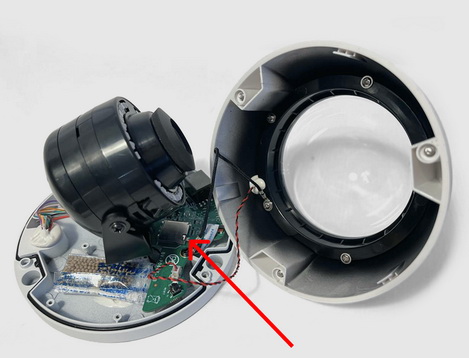
- Faceter Pro D1. On the internal board. Access is by removing the sealed dome, which is attached to the body with three screws.
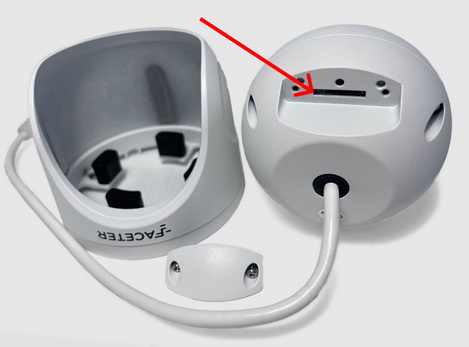
- Faceter Pro T1. On the back of the body. To access it, detach the camera from the mount and unscrew two screws to remove the back cover.
Eco series cameras do not support memory card installation.
Make use of the flexible storage options on Faceter cameras: choose cloud storage, your own SD card, or a hybrid of both.
A memory card for Faceter cameras is not included and must be purchased separately.