
Reset Button: where is the factory reset button located?
The Reset function is available on every Faceter camera: it is used as a last resort to restore the device to factory settings.
We recommend using the Reset button only after a recommendation from our technical support service.
IMPORTANT: Do not disconnect the camera from power during a factory reset. This can cause the equipment to fail with no possibility of recovery!
Button Location by Model
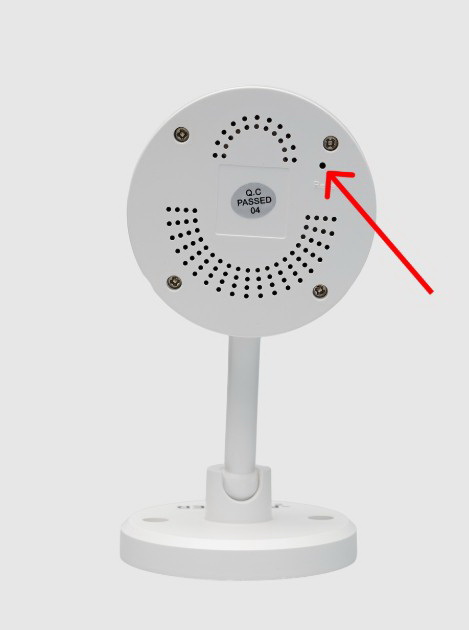
Section titled “Button Location by Model”- Faceter Mini M1. On the back of the camera body.
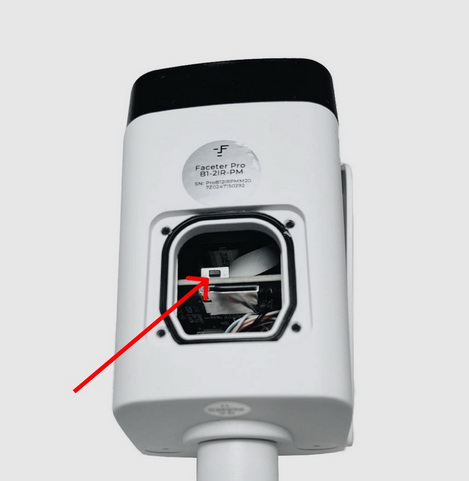
- Faceter Pro B1. On the internal board. Access is through a service opening covered by a sealed cap on the bottom surface of the camera. Four screws must be removed to take off the cap.
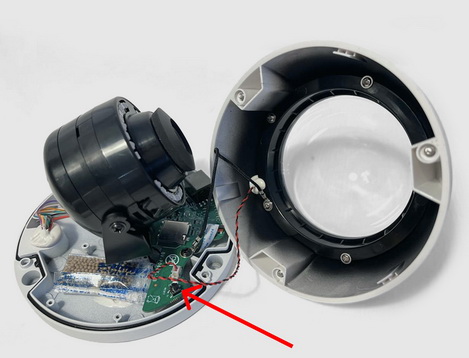
- Faceter Pro D1. On the internal board. Access is by removing the sealed dome of the camera, which is attached to the body with three screws.
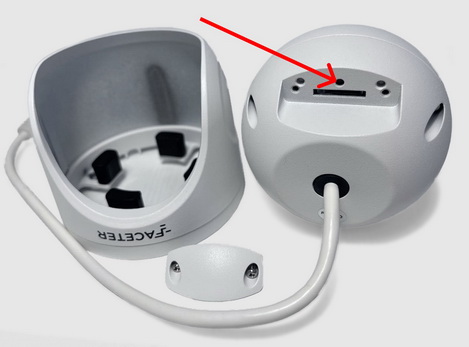
- Faceter Pro T1. On the back of the body. To gain access, detach the camera from its mount and remove two screws to take off the back cover.
For cameras in the Eco series, factory reset is performed through the web interface. For assistance with this, please contact our technical support specialists.
When to Use Reset
Section titled “When to Use Reset”Cases where you may need the Reset button to restore a camera to factory settings:
- Difficulties connecting the camera to the app;
- Need to return the camera to factory settings.